

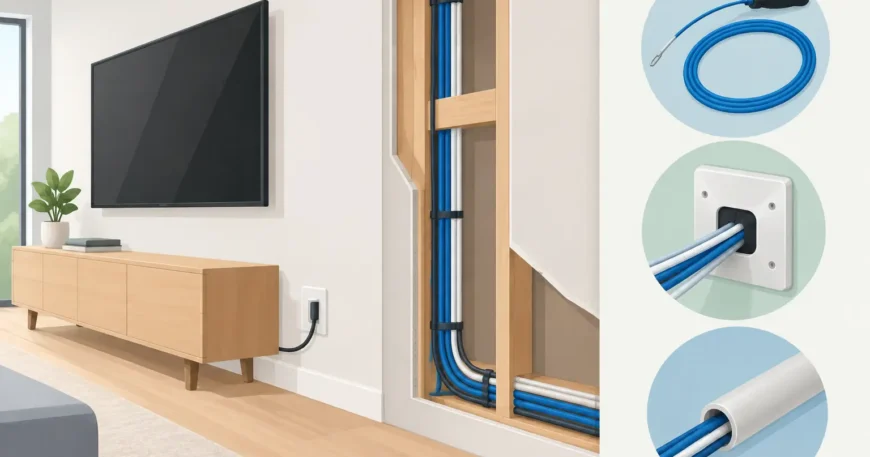
A wall-mounted TV with Wi-Fi dropouts, an office with extension leads under every desk, or a new apartment fit-out with no pathway for future data cabling all start with the same missed step: planning the cable route before the walls are closed. Knowing how to route cables in walls properly gives you cleaner spaces, more reliable connectivity and a system that can be serviced or expanded without opening plasterboard later.
For Ethernet, security cameras, intercoms, AV equipment and fibre pathways, the goal is not simply to hide a cable. It is to create a safe, compliant and accessible route that protects cable performance and the building itself.
How to route cables in walls: start with the full pathway
Do not begin by cutting holes. Start by mapping where every cable begins, where it terminates and what equipment it will support. In a home, this may mean a route from a central network cabinet to a study, TV position, wireless access point and CCTV camera locations. In an office or warehouse, it could mean cable runs between the communications room, work areas, ceiling access points, door intercoms and surveillance equipment.
Mark each outlet, rack, wall plate and equipment location on a simple floor plan. Then identify the most practical path between them. A direct line is not always the best line. You need to allow for wall framing, plumbing, ductwork, insulation, fire-rated barriers and existing electrical services.
For a new build or major renovation, run cables while the framing is exposed. This is faster, less disruptive and usually more affordable than retrofitting. In an existing property, inspect roof spaces, subfloors, service risers, cupboards and bulkheads first. These areas often provide a practical way to get from one part of the building to another without unnecessary wall damage.
Choose cable routes with future capacity
A cable route should serve the current job and leave sensible room for the next one. Pulling an extra data cable or installing conduit during construction costs far less than reopening a finished wall for a later upgrade.
Where possible, use appropriately sized conduit for routes that may need new cable later, particularly between floors, from a communications cabinet to a ceiling space, or to a television and home theatre wall. Include draw wire in empty conduit and label both ends. Avoid filling conduit to capacity, as overcrowding makes cable pulling difficult and can damage the cable jacket.
Keep low-voltage cabling clear of electrical wiring
Data and other low-voltage cables should not share the same pathway as mains electrical wiring. Separation helps reduce electrical interference and avoids unsafe installation practices. The exact separation method depends on the cable type, route, building construction and applicable Australian requirements.
Keep data cabling away from electrical cables where practical, and cross electrical runs at right angles rather than travelling alongside them for long distances. If a route must pass near electrical infrastructure, use a properly planned pathway and obtain advice from qualified trades. Never drill, alter or work around mains wiring unless you are appropriately licensed.
This point matters most for Cat6 and similar network cabling. A cable may look intact after a poor installation, yet still deliver inconsistent speeds, packet loss or intermittent faults caused by interference, sharp bends or excess tension. A neat route is often a reliable route.
Find the wall structure before drilling
Studs, noggins, pipes and electrical cables are hidden until they are not. Use a quality stud finder, inspection camera where access allows, and small exploratory openings before drilling larger holes. Check from both sides of the wall if possible, especially in renovation work where previous alterations may not follow the original framing layout.
Drill through the centre of timber studs rather than close to an edge. Holes near the face of a stud are more likely to be hit later by a screw or nail during picture hanging, cabinetry work or repairs. Fit nail plates where required to protect cabling at framing penetrations.
Metal studs need additional care. Use suitable grommets or bushings so sharp edges cannot cut into cable insulation. Do not enlarge structural members indiscriminately. If the planned opening affects load-bearing framing, consult the appropriate building professional before proceeding.
For masonry walls, the route is usually different. Chasing a wall can be messy, costly and may affect finishes or structural elements. Surface-mounted conduit, a service cavity, ceiling drop or adjacent cupboard route can be the more practical option. The cleanest-looking solution is not always the most sensible one if it prevents future access or creates unnecessary building work.
Pull cable without damaging its performance
Once the path is clear, install the cable with steady, controlled pressure. Do not yank it through tight holes, around sharp corners or through crowded conduits. Respect the manufacturer’s bend radius and pulling tension limits, particularly for Cat6, fibre and pre-terminated assemblies.
Leave a sensible service loop at each outlet and at the communications cabinet. This provides enough cable for termination, re-termination or future equipment changes without leaving excessive loose cable in a wall cavity. Secure horizontal cable runs with suitable low-voltage supports rather than staples that can crush the cable jacket.
Avoid joining data cable inside a wall cavity. A continuous run from the patch panel or network point to the wall outlet is more dependable and easier to test. If a connection point is genuinely required, it should be accessible, housed correctly and labelled.
Label cables at both ends as they are installed. This takes seconds during the job and can save hours when a tenant changes, an office is rearranged or a fault needs to be isolated. Clear labels should identify the location, outlet number or destination, not vague descriptions such as “blue cable”.
Seal penetrations and maintain fire barriers
Wall and floor penetrations can affect fire separation, smoke control, acoustic performance and pest resistance. Any cable route through a fire-rated wall, riser, ceiling or floor slab must be treated as a fire-stopping detail, not a simple hole to fill later.
Use an appropriate fire-rated system for the penetration and cable type, and make sure it remains serviceable if future cables are expected. In commercial buildings, apartment complexes and high-rise retrofits, this is especially important because services often pass between tenancy areas, common spaces and floors.
Do not fill openings with general foam, loose insulation or improvised materials. A cable installation is only complete when penetrations are correctly sealed, documented where required and the wall finish is restored neatly.
Terminate and test before final fit-off
Before wall plates are installed and furniture goes back in place, test every cable. Visual checks alone cannot confirm that a data cable has been routed and terminated correctly. For Ethernet, verify continuity, wire map and performance appropriate to the cable category and intended network speed.
Testing is where hidden installation problems show up: a kinked cable, a damaged pair, an incorrect termination, excessive untwist at the jack or a cable run that exceeds its intended limits. Fixing these issues before final fit-off prevents frustrating callbacks and avoids opening finished walls.
For CCTV, intercoms and wireless access points, confirm both data connectivity and power requirements. Where Power over Ethernet is planned, check that the switch, cable run and endpoint are compatible. For fibre, protect connectors from dust, avoid tight bends and use the correct testing process for the installation.
Keep a basic record of cable routes, outlet labels, test results and equipment locations. Property managers and business owners benefit from this immediately, and it becomes even more valuable at lease changes, renovations or fault call-outs.
When to use a professional cabling installer
Simple low-voltage work can look straightforward until it involves multiple rooms, shared walls, fire-rated construction, fibre, network cabinets or occupied commercial space. In Australia, communications cabling work is subject to requirements that may call for a registered cabler, while mains electrical work must be handled by appropriately licensed electrical professionals.
A professional installer can survey the property, identify efficient pathways, coordinate with other trades and deliver a tested, labelled installation. That is particularly useful for offices, warehouses, apartment buildings and renovations where access is limited and downtime matters.
The best cable route is one you do not have to think about after the job is complete: outlets are where they are needed, performance is dependable, walls are restored properly and there is a clear path for the next upgrade.
