

A lot of new builds still get treated like internet will somehow sort itself out after handover. Then the owners move in, add smart TVs, wireless access points, cameras, a home office and a few streaming devices, and suddenly the Wi-Fi is patchy, the router is shoved in a cupboard, and there are extension leads and loose cables where there should have been proper planning. Structured wiring for new homes fixes that problem before it starts.
If you’re building, this is the stage where low-voltage cabling is easiest, cleanest and most affordable to install. Once plaster is up and finishes are done, every extra cable run becomes slower, messier and more expensive. Good planning now gives you a home network that actually supports the way people live – and work – today.
What structured wiring for new homes actually means
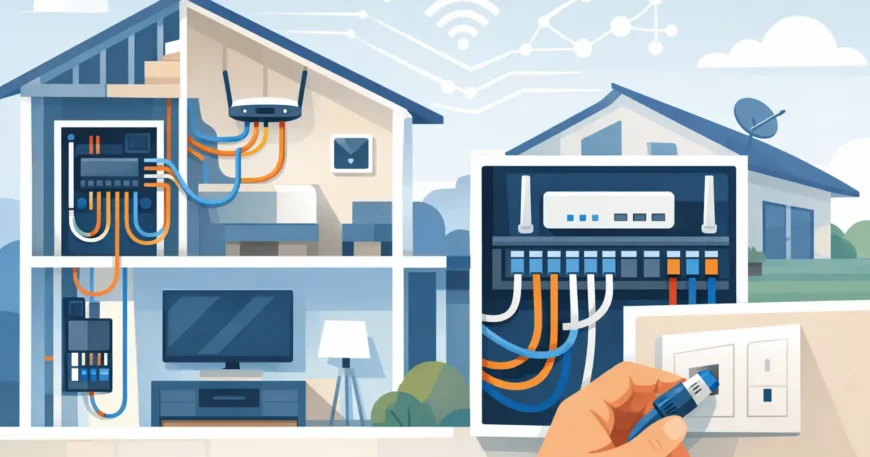
Structured wiring is a planned cabling system that connects the key technology points in a house back to a central location. That can include data outlets, Wi-Fi access points, TV points, security cameras, intercoms, smart home devices and sometimes audio or phone services, depending on the build.
The main difference between structured wiring and an ad hoc setup is that everything is organised from the start. Instead of relying on one router in the study and hoping the signal reaches the back bedroom, you install the right cables to the right places while the walls are open. The result is better performance, cleaner installation and a system that can be serviced or expanded without tearing the place apart later.
For most homes, that central location is a small network cabinet or communications cupboard. This is where your internet service enters the home, where patch panels and switches are housed, and where future upgrades can be managed properly. It does not need to be overcomplicated, but it does need to be planned.
Why it matters more now than it did a few years ago
The average home uses far more connected devices than it used to. It is no longer just a laptop and a TV. Now there are workstations, gaming systems, streaming boxes, IP cameras, door stations, smart lighting hubs, alarm systems, wireless access points and appliances that all want stable connectivity.
Wi-Fi still matters, but Wi-Fi works best when it is supported by proper cabling. A strong wireless network usually depends on wired backhaul to ceiling-mounted access points, not one all-in-one modem struggling to push signal through brick, tile and insulation. If you want reliable coverage across multiple rooms or levels, cabling is the foundation.
That is especially true in larger homes, double-storey builds, concrete construction, or properties with detached garages, pool houses or outdoor entertainment areas. These layouts expose the limits of a basic off-the-shelf setup very quickly.
The cabling most homeowners should consider
Not every home needs every option, and this is where practical planning matters. Some owners want a straightforward Ethernet network with strong Wi-Fi coverage. Others want the full package with surveillance, intercoms, smart home integration and media distribution. The right scope depends on how the home will be used.
For most new builds, Cat6 cabling is the sensible baseline for data. It supports current internet and network demands well, gives you headroom for future upgrades, and is suitable for computers, smart TVs, access points, cameras and other networked devices. Cat5e can still work in some applications, but on a new build the cost difference often does not justify designing to an older standard.
Typical locations for data points include home offices, living areas, bedrooms, TV locations and any position likely to need a fixed connection. Ceiling locations for wireless access points are also worth serious consideration. They are one of the simplest ways to improve whole-house wireless performance, but they need cable in place early.
Security and access systems also benefit from pre-wiring. If you are considering CCTV, a video door station, gate intercom or alarm components, running cable during construction is far easier than retrofitting once the home is complete.
Planning room by room works better than guessing
One of the most common mistakes in structured wiring for new homes is underestimating how each space will actually be used. A spare bedroom may become an office. A media room may end up with a smart TV, gaming console, sound system and streaming hardware. An alfresco area may need Wi-Fi, audio or cameras.
That is why room-by-room planning usually delivers a better outcome than simply asking for a few data points. Think about work, entertainment, security and coverage. Think about where furniture is likely to go. Think about whether there are double-brick walls, stone finishes or other materials that can affect wireless performance.
A good installer will also look at pathways and central equipment placement, not just outlet locations. There is no real benefit in having well-placed data points if the network cabinet ends up in a hot, cramped cupboard with no power, no ventilation and no practical room for equipment.
Where the central hub should go
The communications hub is the nerve centre of the system, so location matters. It should be accessible, protected, powered and suitable for the equipment being installed. A garage can work in some homes. A dedicated cupboard can work well too. The wrong choice is usually a random cavity or a wardrobe corner with no airflow and no service access.
You want enough space for the NBN or service handoff, patch panel, network switch, router, possibly a UPS, and room for future additions. Even if the initial setup is simple, expansion is common. A home office today can become two workstations later. A basic camera setup can grow. Wireless coverage can be refined with additional access points.
This is one of those areas where a small amount of planning avoids a lot of frustration later.
Trade-offs to think about before the walls close
There is always a balance between budget, current needs and future proofing. Some owners want to wire every room heavily from day one. Others want to keep costs tighter and focus on the core areas. Both approaches can work if the planning is honest.
If budget is limited, it often makes sense to prioritise backbone infrastructure first – quality data cabling to the office, living areas, access point locations and any camera positions – then leave room to add devices later. Putting conduit in key pathways can also be a smart move where full cabling is not being installed immediately.
Another trade-off is between visible convenience and long-term performance. Mesh Wi-Fi kits can be useful, but they are not a replacement for properly cabled access points in every situation. In smaller homes, mesh may be enough. In larger or more demanding homes, hardwired infrastructure usually performs better and is easier to scale.
Working with your builder and other trades
Low-voltage work should be coordinated early, ideally before electrical rough-in is locked down. That gives enough time to review floor plans, choose cable routes and avoid conflicts with power, plumbing, cabinetry and ceiling services.
This is also where professional installation matters. Cabling needs to be run neatly, terminated correctly, labelled clearly and tested properly. Poor terminations, badly planned pathways and unlabelled cable runs create problems that often do not show up until move-in day.
For homeowners, developers and project managers, the value of using one team for design, installation and final setup is simple: fewer gaps, fewer surprises and a cleaner result. Georgia Technical Services works in that practical, start-to-finish way, which is exactly what most build projects need when timelines are tight and multiple trades are involved.
A good system should still make sense five years from now
Technology changes, but good cabling infrastructure lasts. That is why the best structured wiring plans are not built around one device or one internet package. They are built around flexibility. You should be able to change providers, upgrade network equipment, add cameras, improve wireless coverage or convert a room to a home office without starting from scratch.
That does not mean overbuilding for the sake of it. It means making sensible choices that keep your options open. In most cases, that starts with quality cabling, sensible outlet placement, a proper central location and enough capacity to grow.
When structured wiring is done properly in a new home, you notice it less – and that is the point. The internet works where it should. Devices stay connected. Security systems respond properly. The house is ready for the way you live, not just the day you move in.
If you are still at plan stage, this is the right time to ask better questions, mark up the layout properly and get the cabling infrastructure sorted before the plaster goes on. It is one of the few parts of a build that becomes harder and dearer the longer you leave it, and one of the few upgrades you will appreciate every day without thinking about it.


1 Comment
💼 Payment 169.10 USDT - graph.org/BALANCE-3682444-USD-04-21-3?hs=3b3c1715e8893a08954e81da0ce4840d& 💼
w5ym4s