

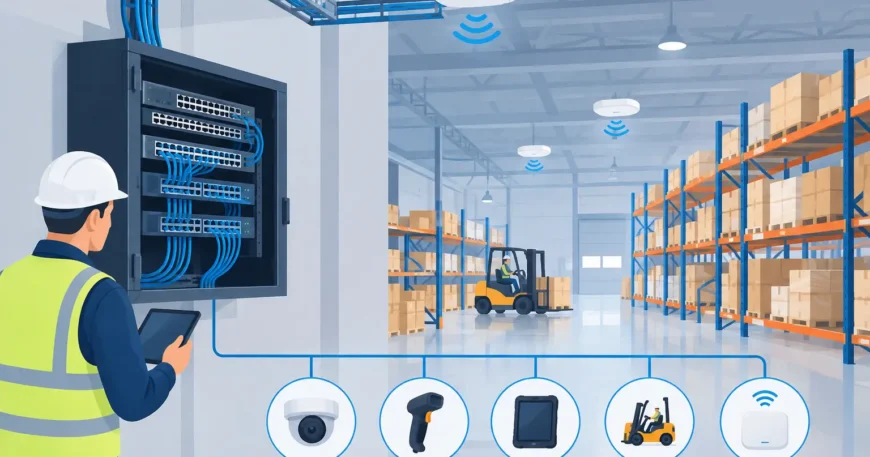
A warehouse network failure rarely starts at the switch. More often, it starts with cable runs that were rushed around racking, wireless access points placed without checking coverage, or a communications cabinet that has no spare capacity. This industrial network installation example shows how a practical installation can support office staff, scanners, CCTV, loading docks and future expansion without making the site difficult to maintain.
The scenario is a mid-sized warehouse with an attached office, dispatch area, loading bays and high-bay storage. The client needs reliable wired connections for workstations, printers, network switches, IP cameras and access points. They also need Wi-Fi coverage for handheld devices across the floor. The answer is not simply to pull cable where it is convenient. It is to build a structured cabling system that gives every service a clear, tested path back to the network.
Industrial network installation example: warehouse rollout
Before installation, the site is surveyed with operations in mind. That means checking ceiling height, existing cable trays, racking layouts, electrical services, fire penetrations, machinery, cold areas and traffic routes for forklifts. A route that looks straightforward on a drawing may be inaccessible once stock is in place or may place cable where it can be damaged by daily operations.
The survey also identifies where the main communications cabinet should sit. In this example, the best location is a secure, ventilated room near the office rather than on the warehouse floor. It is accessible to authorised staff, protected from dust and impact, and close enough to the incoming service and core equipment to keep the installation orderly.
From that cabinet, fibre is used as the backbone to a smaller industrial-rated cabinet on the far side of the warehouse. Cat6 cabling then runs from each cabinet to fixed devices. This approach avoids trying to push long copper runs across a large site and creates a sensible split between the office network and warehouse distribution point.
What the physical installation includes
The main cabinet is fitted with patch panels, cable management, network switches, a UPS and clearly marked power outlets. Each cable is terminated to a numbered patch panel port, then matched to a labelled outlet or device location. This may sound basic, but accurate labelling saves significant time when a camera, access point or workstation needs to be moved or diagnosed later.
Cable pathways are installed using appropriately supported trays, conduit and fixings. Cables are kept separate from electrical runs to reduce interference and make future work safer. Where a cable must cross a fire-rated wall or ceiling, the penetration is sealed correctly after the cable is installed. In warehouse areas, exposed routes are protected from forklift impact, suspended loads and routine maintenance activity.
The warehouse cabinet provides local ports for high-use equipment. These may include wireless access points, IP cameras at loading bays, a network printer, a time-clock terminal and a workstation for dispatch. Power over Ethernet can supply compatible cameras and access points over the data cable, reducing the number of separate power points required at each device. It is a practical option, although the switch power budget must be calculated before equipment is added.
Planning coverage, capacity and cable type
An industrial installation must allow for what the site does now and what it may do next. A warehouse that only needs six cameras today may add more coverage after a security review. A business using two handheld scanners may later introduce mobile picking, automated inventory systems or additional access points. Running only the exact number of cables needed is cheaper on day one, but it can create unnecessary disruption and expense later.
In this example, spare Cat6 runs are placed at key locations: near loading bays, along the warehouse perimeter, in the office ceiling for additional access points and at future workstation positions. Spare capacity is also left in the tray and conduit pathways. The cabinet has room for extra patch panel ports and switch capacity, rather than being filled from the start.
Cat6 is generally a sensible choice for fixed copper connections in a modern warehouse. It supports high-speed Ethernet over typical structured-cabling distances and is suitable for cameras, access points, phones and office devices. Fibre is preferred between buildings, across longer internal distances or where electrical interference is a concern. The final choice depends on distance, network speed requirements, the environment and planned growth.
Wireless is planned separately from cabling. Access points need wired backhaul and sensible placement, not just a convenient power source. Metal racking, stock density, cool rooms and machinery can affect signal performance. In a busy warehouse, coverage should be tested where scanners and mobile devices are actually used, including loading areas and the ends of aisles. A strong signal in an empty building is not proof of reliable performance during normal operations.
Installation without stopping the operation
Most warehouse clients cannot afford to close the site for network work. The installation schedule should therefore be built around receiving times, dispatch peaks, shift changes and safety requirements. Some cable routes can be installed outside peak periods, while cabinet cutovers may be planned for a quieter window.
Clear communication matters as much as cable work. Staff need to know which areas will have contractors overhead, when a device may be temporarily offline and which access routes must stay clear. If equipment needs to be disconnected, it should be identified in advance and restored in a controlled sequence. A rushed cutover can leave a printer on the wrong network, a camera without recording or an access point powered but not configured.
For larger sites, it is often better to complete the work in stages. The backbone and cabinets can be installed first, followed by office outlets, warehouse devices, cameras and wireless equipment. Staging reduces risk and gives the client a chance to confirm that each area is operating as expected before the next section is changed.
Testing is part of the installation, not an extra
Every permanent copper cable should be tested after termination. Certification testing confirms that the installed run meets the performance standard required for its category. A basic continuity check alone may find an open wire, but it does not confirm that a high-speed data connection will perform reliably.
Fibre links also need testing, including verification of correct termination and acceptable signal loss. Once active equipment is connected, the installer should confirm link speed, Power over Ethernet delivery where required, and connectivity to the correct switch port. Cameras, access points and other endpoints are then checked in their real operating positions.
Documentation is handed over with the completed installation. At minimum, this should show cabinet layouts, patch panel numbering, outlet locations, cable labels and test results. For a property manager or operations team, this record turns future changes from a guessing game into straightforward maintenance.
Where the example changes
Not every industrial site has the same conditions. A light warehouse with office space may only need Cat6, a small fibre uplink and a handful of access points. A manufacturing facility may need shielded cabling, more careful separation from electrical equipment, hardened enclosures or network design that accounts for production controls. A multi-building site may need underground pathways, external-rated fibre and additional protection against weather and physical damage.
Security requirements also change the design. Sites with valuable stock may require cameras at gates, docks, perimeter doors and internal aisles, with dedicated storage and bandwidth planning for video. In contrast, a site focused on inventory scanning may place more emphasis on wireless coverage and redundant paths to avoid interruptions during dispatch.
The common requirement is a network installation that is clean, labelled, tested and built around the way people work. Georgia Technical Services approaches these projects as a complete low-voltage installation, from cable pathways and fibre backbone through to Ethernet outlets, surveillance connections and final testing.
A well-planned warehouse network should make daily work easier, not create another point of failure. Start with the routes, cabinet space and coverage your operation needs now, then leave a practical path for the next camera, access point, workstation or expansion.

