

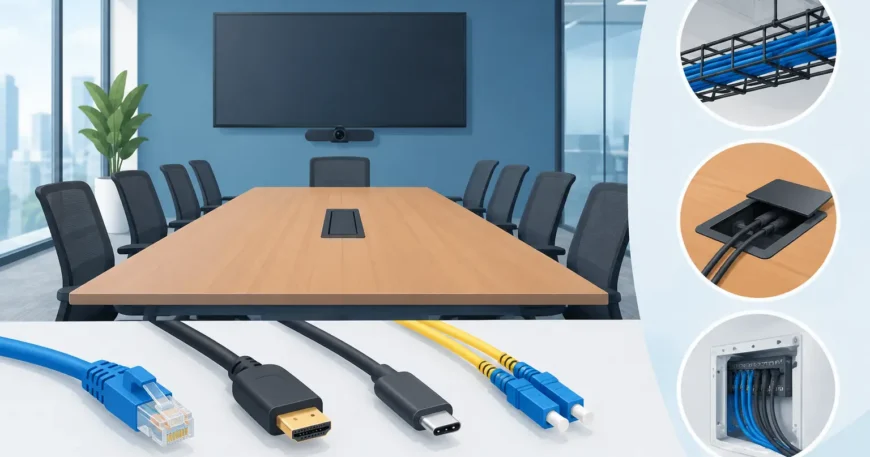
A conference room can have premium displays, a quality camera and the right meeting platform, yet still fail at the moment a laptop is connected. The issue is often not the equipment. It is the cabling behind the table, display wall and ceiling. Choosing the best conference room cabling options means planning for reliable data, video, power and control connections before the room is finished – not trying to hide adaptors and extension leads after staff move in.
For office managers, business owners and property teams, the practical goal is simple: every person should be able to start a meeting quickly, join a video call clearly and use the room without calling IT. A professionally installed low-voltage system makes that possible while keeping cables protected, labelled and ready for changes later.
Start with the room’s actual use
There is no single cable package that suits every meeting room. A small huddle room used for quick calls has different requirements from a boardroom hosting client presentations, training sessions and hybrid meetings. Before selecting cable types, consider how many people use the room, which devices they bring, whether video conferencing is permanent, and how often the room layout may change.
A room with one display and a short table may need a straightforward data connection, USB-C charging and a presentation input. A larger boardroom may require multiple network points, ceiling access point cabling, camera and microphone connections, dual displays, touch control and spare capacity for future equipment.
The best result is usually a structured cabling approach. Rather than running one-off leads wherever a device happens to sit, permanent cabling is routed through approved pathways to a communications rack or equipment location. Equipment can then be upgraded without opening walls or replacing the entire installation.
Best conference room cabling options for core connectivity
Cat6 cabling for most office meeting rooms
Cat6 Ethernet remains the practical choice for many conference room installations. It supports gigabit network performance and can also carry Power over Ethernet (PoE) to compatible devices. That matters because IP cameras, wireless access points, touch panels, IP phones and some conferencing hardware can receive data and power through a single cable.
For a typical office room, Cat6 runs may serve the table box, wall-mounted display, conferencing system, wireless access point and a spare outlet for future use. It is affordable, widely compatible and easier to manage than relying on wireless connections alone.
Cat6 is a strong fit when cable runs are within standard office distances and the room does not require 10-gigabit performance across every connection. It also gives staff a dependable wired option when Wi-Fi is congested or a visitor’s wireless access is restricted.
Cat6A for higher bandwidth and future capacity
Cat6A is worth considering for new fit-outs, high-use boardrooms and rooms expected to remain in service for many years. It supports 10-gigabit Ethernet over longer copper runs and offers better resistance to interference than lower-specification cabling.
The trade-off is cost and installation space. Cat6A cable is thicker, requires suitable termination hardware and needs careful planning in conduits, ceiling pathways and table furniture. It is not automatically necessary for every small meeting room. However, when walls are being opened or a major refurbishment is underway, installing Cat6A can be more cost-effective than recabling later.
A common approach is to use Cat6A for backbone links, high-demand rooms and critical equipment locations, then use Cat6 where the expected demand is lower. The right choice depends on the building’s network design, budget and growth plans.
Fibre optic cabling for long runs and building links
Fibre optic cable is generally not the primary connection from a conference table to a laptop. Its value is in the backbone. It is the right option where a conference room is far from the main communications room, located in another building, or part of a larger office, warehouse or multi-level property.
Fibre provides high bandwidth over long distances and is not affected by electromagnetic interference. It is particularly useful near industrial equipment, lift systems or other environments where copper performance can be compromised. A fibre backbone to a local communications cabinet, followed by Cat6 or Cat6A to room devices, gives larger sites a reliable and scalable design.
Video and presentation cabling need careful planning
Network cabling is only one part of the room. Presentation and video conferencing systems also need a clean way to connect laptops, displays, cameras and audio equipment.
HDMI is still common for direct video connections and works well over short distances. It is useful at a table box or wall plate where users need a familiar plug-in option. The limitation is distance. Long HDMI leads can become unreliable, are difficult to replace inside finished walls and may not support the resolution or refresh rate required by newer displays.
For larger rooms, HDMI extenders over category cable or fibre can carry video from the table to the display wall over greater distances. This keeps the cable path neater and makes servicing easier, provided the extender system is selected and installed as a complete compatible solution.
USB-C is increasingly important because many current laptops use it for charging, video and data. A well-designed USB-C connection at the table can reduce the collection of adaptors staff bring to meetings. Still, USB-C specifications vary considerably. Not every USB-C cable supports the same charging level, video output or data speed. Long USB-C runs also require active solutions or purpose-built conferencing hardware. It should be specified around the actual laptop and display setup, not assumed to work because the connector fits.
Wireless presentation systems can reduce cables on the table, but they should not be treated as the only option. They rely on network conditions, compatible software and user devices. A hard-wired HDMI or USB-C connection provides a sensible fallback when a guest cannot connect wirelessly or a critical presentation must start without delay.
Do not overlook power, PoE and cable pathways
A polished room installation is not just about the visible connection points. It also depends on safe power access, suitable containment and clear separation between power and low-voltage cabling. Data and AV cable should not be loosely run alongside mains wiring, across footpaths or under rugs. Apart from looking unprofessional, this creates maintenance and safety problems.
Floor boxes, table boxes, wall plates, cable trays and conduits should be selected before furniture is fixed in place. The meeting table location, display wall, camera position and equipment cabinet all influence the cable route. If the room may be reconfigured, allow spare conduit or accessible pathways so additional cable can be installed later.
PoE can simplify installation by powering compatible cameras, access points, control panels and phones through Ethernet cable. It reduces the number of power outlets needed at device locations, but the network switch must have adequate PoE capacity. This needs to be calculated across all connected devices, rather than assuming any PoE switch will handle the load.
Build in spare capacity from day one
The most expensive cabling decision is often the one that leaves no room to expand. Adding extra data outlets, spare category cable runs or empty conduit during construction costs far less than reopening a finished ceiling or wall later.
A practical conference room installation often includes at least one spare network outlet at the display wall, spare capacity near the table and an additional ceiling run where another access point, microphone or sensor may be needed. Every cable should be tested, labelled at both ends and documented. Clear labelling saves time when equipment is replaced, faults are diagnosed or an office is handed over to a new facilities team.
It is also worth keeping active equipment accessible. Hiding a switch, extender or power supply inside an inaccessible ceiling may make the room look tidy on day one, but it makes a simple service call difficult later. A nearby cabinet, credenza or properly planned equipment rack is usually the better long-term option.
When a professional installation makes the difference
Conference room cabling often crosses several systems: network infrastructure, displays, audio, video conferencing, Wi-Fi, power coordination and furniture integration. A professional installer can assess the room, identify practical cable routes, terminate and test the cabling, and coordinate the work so the final result is clean and serviceable.
For new offices, renovations and multi-room upgrades, it is usually better to design the cable plan alongside the room layout and AV equipment selection. This avoids the common outcome of having quality meeting technology connected by temporary leads and adaptors that undermine the whole investment.
The right cabling should make a conference room feel simple to use, not technically impressive for its own sake. Plan for the meetings your team runs now, leave capacity for what changes next, and make sure every connection is installed where people genuinely need it.
