

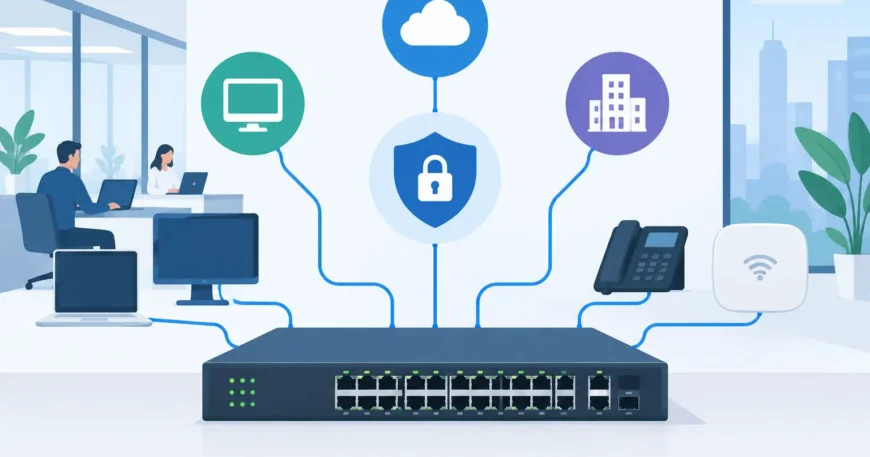
A slow office network is not always an internet-provider problem. One video call can affect accounting, security cameras can compete with staff devices, and a single faulty cable can be difficult to find in a busy comms cabinet. That is why whether to use managed switches is a practical question for any business, warehouse, apartment property or larger home that depends on reliable connectivity.
A basic unmanaged switch simply passes traffic between connected devices. That can suit a small, simple setup. A managed switch gives the network owner or installer control over how traffic moves, which devices can communicate, and how faults are identified. It is a more considered choice when the network supports more than a few computers.
Why use managed switches for growing networks?
Managed switches are built for networks that need to be organised, monitored and expanded without creating unnecessary disruption. They allow an installer to configure each port, separate types of traffic, prioritise critical services and review what is happening across the network.
For a small office, that may mean keeping business computers, guest Wi-Fi and IP phones separate. In a warehouse, it may mean ensuring scanners, access control, CCTV and administration systems do not interfere with one another. In a multi-dwelling building, it can help keep each tenancy or apartment logically separate while using a shared backbone.
The benefit is not configuration for its own sake. It is a network that is easier to operate, easier to troubleshoot and better prepared for the next stage of growth.
Separate devices without installing separate networks
Virtual LANs, commonly called VLANs, are one of the main reasons to use managed switches. A VLAN separates devices logically, even when their cables terminate in the same switch or rack.
For example, a business can place staff computers on one network segment, guest wireless on another, and cameras on a third. Guests can access the internet without gaining a path to internal files or printers. Cameras can record to their network video recorder without using unnecessary bandwidth on office devices.
This approach is also valuable in apartment buildings, retail sites and shared commercial properties. It supports cleaner network design and gives property managers better control over shared services. The physical cabling remains tidy and centralised, while the network itself is properly organised.
Give priority to traffic that cannot wait
Not all network traffic has the same urgency. An email can wait a fraction of a second. A VoIP call, door intercom, payment terminal or live surveillance feed cannot afford regular dropouts and delay.
Managed switches can use quality of service settings to give priority to time-sensitive traffic. When the network is busy, voice, video and operational systems can be handled ahead of less urgent downloads or guest browsing. This does not create more internet bandwidth, but it helps the available capacity be used sensibly.
For offices with VoIP phones, warehouses using wireless handhelds, or properties with IP intercoms and cameras, this control can make a noticeable difference to day-to-day reliability.
Better visibility when something goes wrong
When an unmanaged switch has a problem, diagnosis often starts with unplugging devices, swapping cables and making educated guesses. That may be acceptable for a small home setup, but it costs time in a business environment.
A managed switch can show whether a port is active, how much traffic it is carrying, whether it is reporting errors, and in many cases which device is connected. This gives technicians a much clearer starting point. A failing cable run, overloaded uplink or device creating unusual traffic can be found faster.
Port monitoring is especially useful in structured cabling installations where many Cat6 cables terminate in one cabinet. Instead of tracing every lead by hand, the network can be checked from the switch configuration and then tested at the relevant outlet or device.
Managed switches can also send alerts for events such as a disconnected uplink, failed power supply or unusual port activity. For a site that relies on cameras, access control or internet service for tenants, earlier warning can prevent a minor issue becoming an extended outage.
Improved security for connected systems
Every network-connected device is a potential entry point. That includes computers and mobile devices, but also printers, cameras, smart televisions, door controllers and wireless access points. An unmanaged switch provides little ability to control what joins the network or where it can go.
Managed switches offer features that help reduce that exposure. Port security can limit which device is permitted on a particular port. Unused ports can be disabled. VLANs can isolate equipment that does not need access to business systems. Access control lists can restrict traffic between selected devices or network segments.
The right settings depend on the site. A family home with a few wired devices does not need the same policy as a medical practice or apartment complex. Still, separating security cameras and smart devices from computers holding sensitive information is a sensible design decision in many installations.
Security settings need to be planned and documented. Incorrect rules can stop legitimate services from working, which is why configuration should follow a clear network design rather than be added as an afterthought.
Power devices through the network cable
Many managed switches are available with Power over Ethernet, or PoE. This lets one Ethernet cable deliver both data and power to compatible devices such as wireless access points, IP cameras, VoIP phones, intercom stations and some access-control equipment.
PoE can reduce the need for separate power outlets near each device. That makes installation cleaner and can be particularly useful in ceilings, car parks, warehouse areas and external camera locations where power is not readily available.
It is worth checking the power budget, not just the number of PoE ports. A switch may have enough ports for 24 cameras, for example, but not enough total wattage to power every camera if they use infrared lighting at night. The switch, camera specifications and future additions should be assessed together.
When an unmanaged switch is still the sensible choice
Managed equipment is not automatically the best choice for every job. It costs more than a basic switch, takes time to configure, and may need ongoing support. For a homeowner connecting a television, gaming console and one desktop to a single router, an unmanaged switch is often perfectly adequate.
The same can apply to a small temporary setup with only a few devices and no requirement for separate networks, security controls or monitoring. Adding complexity where it is not needed can create its own problems.
The decision changes when downtime affects staff, tenants, customers or security. If the site has multiple access points, IP phones, surveillance cameras, a server, guest Wi-Fi, several departments or plans to expand, managed switching is usually the better long-term investment.
Plan the switch around the cabling and the site
A managed switch performs best when it is part of a properly planned network. The number of data outlets, location of wireless access points, uplink speed, internet service, PoE demand, rack space and backup power all matter. A quality switch cannot compensate for poor cable terminations, unsuitable cable runs or an overcrowded cabinet.
For larger premises, it is often sensible to use a central core switch with additional managed switches in separate areas. Fibre backbone cabling may connect cabinets across floors, buildings or long warehouse distances, while Cat6 serves desks, cameras and access points locally. This arrangement supports faster links where they are needed and keeps future upgrades manageable.
Documenting port labels, VLAN assignments and device locations is just as valuable. When a new tenant moves in, a camera is added or a fault occurs after hours, clear records save time and avoid unnecessary disruption.
A practical investment in network control
Managed switches are not just for large enterprise sites. They are a sensible option whenever a network supports work, security, tenants or connected building systems. They provide the control to separate traffic, prioritise essential services, supply power to compatible devices and identify faults with less guesswork.
For a new fit-out, renovation or network upgrade, choose the switch after assessing the whole installation rather than buying on port count alone. A properly designed cabling and switching system gives the site room to change without turning the next upgrade into a costly rebuild.
